
📋 Product Changelog
Every update,
one place
New features, improvements, and fixes.
2026
13 Mar 2026
Dark mode, new Personal Details page, AutoSheet improvements, and more
7 New
3 Improvements
New Features
AutoSheet week view
Added a week view mode with per-day tabs, week-specific actions, and a redesigned summary experience including a logged-time widget, combined projects/tags/linked-work card, and quick date-jump controls (Today/This Week).
Delete activities from AutoSheet timeline
Added the ability to permanently delete memories directly from the AutoSheet timeline via an "Edit Activities" mode, with a hover-to-delete popover and confirmation dialog.
Dark mode
Dark mode is now supported across all settings and workspace pages.
Personal Details settings page
The Personal Details settings page has been rebuilt with a faster, more modern experience.
Custom AutoSheet summary intervals
You can now set custom summary intervals in AutoSheet, including a new 10-minute option.
Persistent task filters
Your last selected filters on the Tasks page are now remembered and restored when you return.
Dedicated email & sign-in settings
Email address, linked emails, and authentication settings now have their own dedicated settings page.
Improvements
AutoSheet header & options
The AutoSheet title is now visible in the header, and the AutoSheet Options button has moved to the top right for easier access.
Default summary interval
The default AutoSheet summary interval has changed from 30 minutes to 15 minutes.
Smarter "Back to Timely" navigation
The "Back to Timely" button in settings now returns you to the page you came from, rather than a fixed destination.
6 Mar 2026
Settings redesign, new admin tools, and more
1 New
1 Improvement
New Features
Settings sidebar navigation
The settings area has been redesigned with a new vertical sidebar layout, making it easier to find and navigate between sections.
Improvements — Settings & Admin
Recovered transactions in Balance History
Recovered transactions now appear alongside standard transactions in the Balance Transaction History.
27 Feb 2026
Bulk editing in AutoSheet, Asana subtasks, and more
5 New
3 Improvements
New Features
Richer AutoSheet timeline interactions
Hover over activities to highlight time spans, reassign activities directly from the timeline, and select multiple activities by clicking or dragging.
Batch edit time entries in AutoSheet
Select multiple time entries at once to change their project, linked work, or assignee — or delete them all in one go.
Filter ClickUp tasks by assignee
Opt in to a setting that limits which ClickUp tasks are visible to each user, so people only see tasks they're directly assigned to.
Bulk task creation
Create multiple tasks at once from the Tasks list, assigning one per team member with a shared title, description, project, and dates. Capacity warnings flag any scheduling conflicts automatically.
Upgraded projects page
The projects list now supports sortable columns, pagination, adjustable column visibility, and faster server-side search.
Improvements
Log time to Asana subtasks
You can now log time directly to Asana subtasks, with support for up to 5 levels of nesting between a project and a task.
Persistent report template filters
The "Created by" filter on the Report Templates page is now remembered when you navigate away and come back.
Team leads can send time logging reminders
Team leads can now send time logging reminders to their team members — no need to escalate to admins.
16 Feb 2026
AutoSheet improvements & UX updates
6 Improvements
AutoSheet & Linked Work
Fixed AutoSheet notes overwriting
Fixed an issue where AutoSheet notes were being overwritten on existing time entries.
Notes regeneration uses preset language
Fixed AutoSheet notes regeneration to use your preset language instead of defaulting to English.
Updated Linked work widget name
Updated Linked work widget name for better clarity.
Regenerate notes in the notes field
Added the ability to regenerate notes directly in the notes field.
User Experience
Project assignees filter on Tasks page
Added project assignees filter on the main tasks page for faster filtering.
Fixed timesheet export
Fixed timesheet export functionality.
20 Jan 2026
New Asana integration 🦄, advanced reporting & Linked Work features
New Integration
8 Improvements
New Features
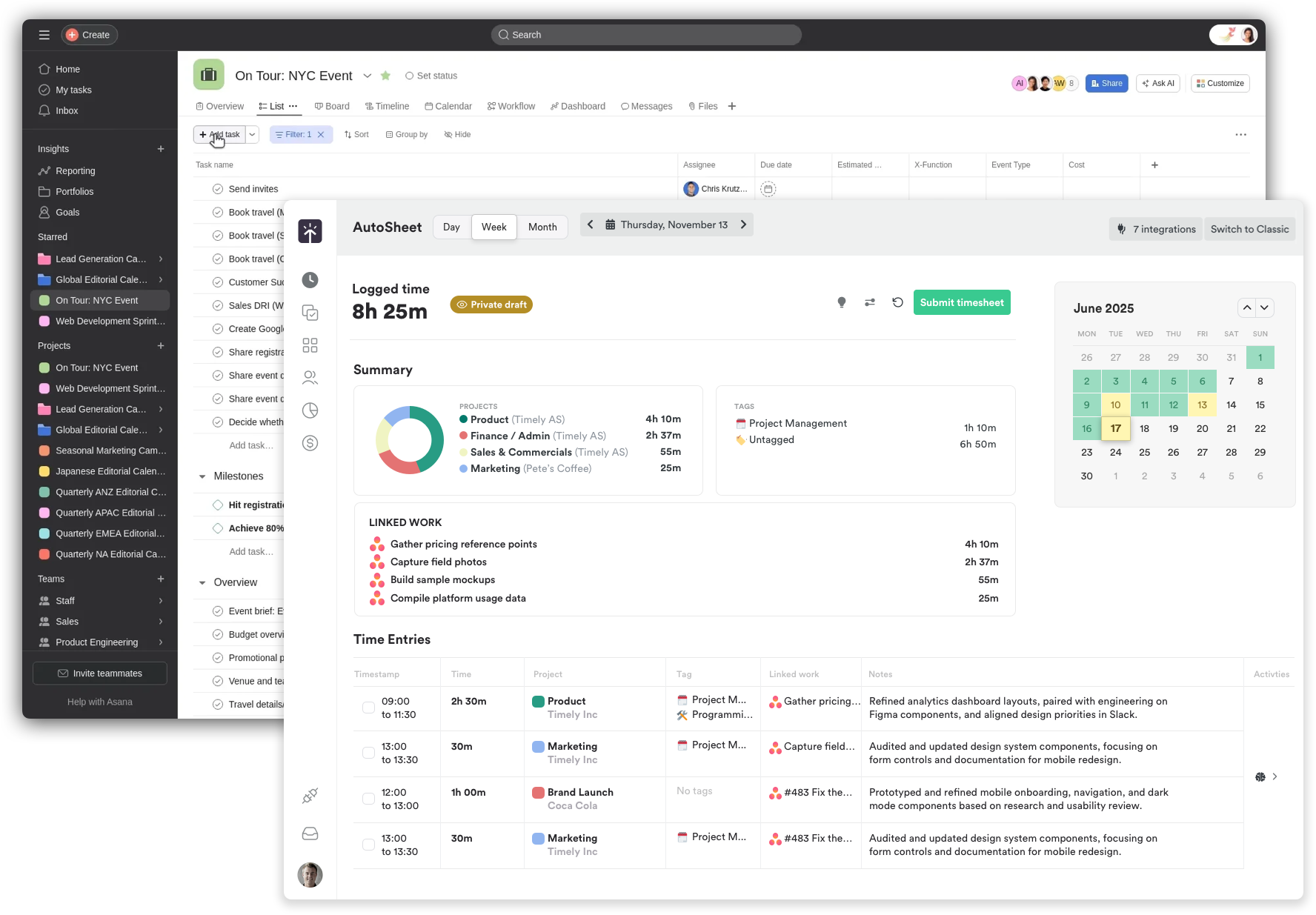
New Asana sync integration
We're stoked to launch a new Asana sync integration for effortless, AI-powered time tracking. Built on Timely's new Timeline infrastructure, it pairs perfectly with AutoSheet's Linked Work so you can log time in a single click. Projects, tasks, teams, and time entries stay automatically in sync. Learn more →
Improvements — Integrations
MS Teams auto-connects new users
MS Teams integration now automatically connects new users when they're invited to workspaces.
ClickUp archived task cleanup
ClickUp archived tasks are now properly deleted in Timely.
Azure AD imported users in Unassigned modal
Azure AD imported users now appear in the "Unassigned users" modal.
Bulk invite from Unassigned user list
Admins now have the ability to search users and invite in bulk from the Unassigned user list.
Improvements — Onboarding
Simplified calendar setup
Simplified calendar setup with guided onboarding and automatic permission requests during sign-up.
Improvements — AutoSheet & Linked Work
Task description tooltip
Added task description to tooltip – view task details on hover for better context.
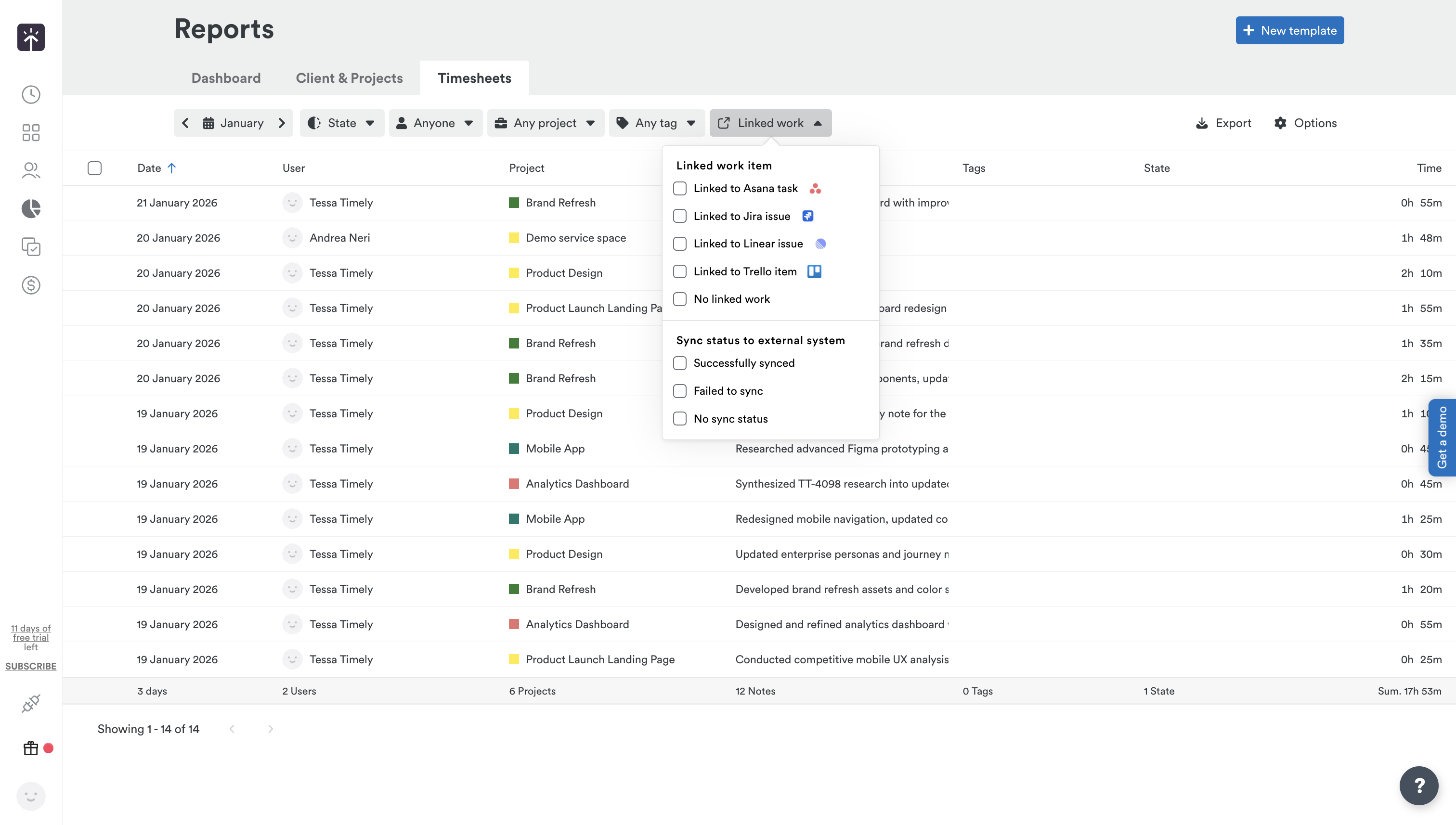
Linked work in report exports
Added linked work item id, title and sync status to report exports.
Improvements — Reporting & Exports
Quarterly & yearly report breakdowns
Added quarterly and yearly report breakdowns to the Client & Project report page.
2025
24 Dec 2025
Improved Memory visibility, navigation, and language support for AutoSheet & Timesheets
6 Improvements
AutoSheet & Timesheet Improvements
View-only timeline for AutoSheet
Added a view-only timeline for AutoSheet that displays entries alongside memories.
Preview activities before generating a timesheet
Users can now see Activities/Memories before generating a timesheet, showing icons of top most used apps and activities ordered by time.
Japanese and Arabic language support
Added Japanese and Arabic language support for AutoSheet notes generation.
Keyboard navigation for linked work dropdown
Navigate the linked work dropdown using your keyboard: use arrow keys to browse items, Enter to select, and Escape to close the dropdown.
New timesheet filters for linked work & sync status
Added new Timesheet filters — filter by whether entries are linked to a work item and by sync status (Synced, Not synced, or No sync status).
Prevent submitting timesheets for locked days
Added a validation to prevent submitting timesheets for locked days.
9 Dec 2025
Seamlessly connect your dev workflow with the new Jira & Linear integrations 🚀
2 New Integrations
New Integrations
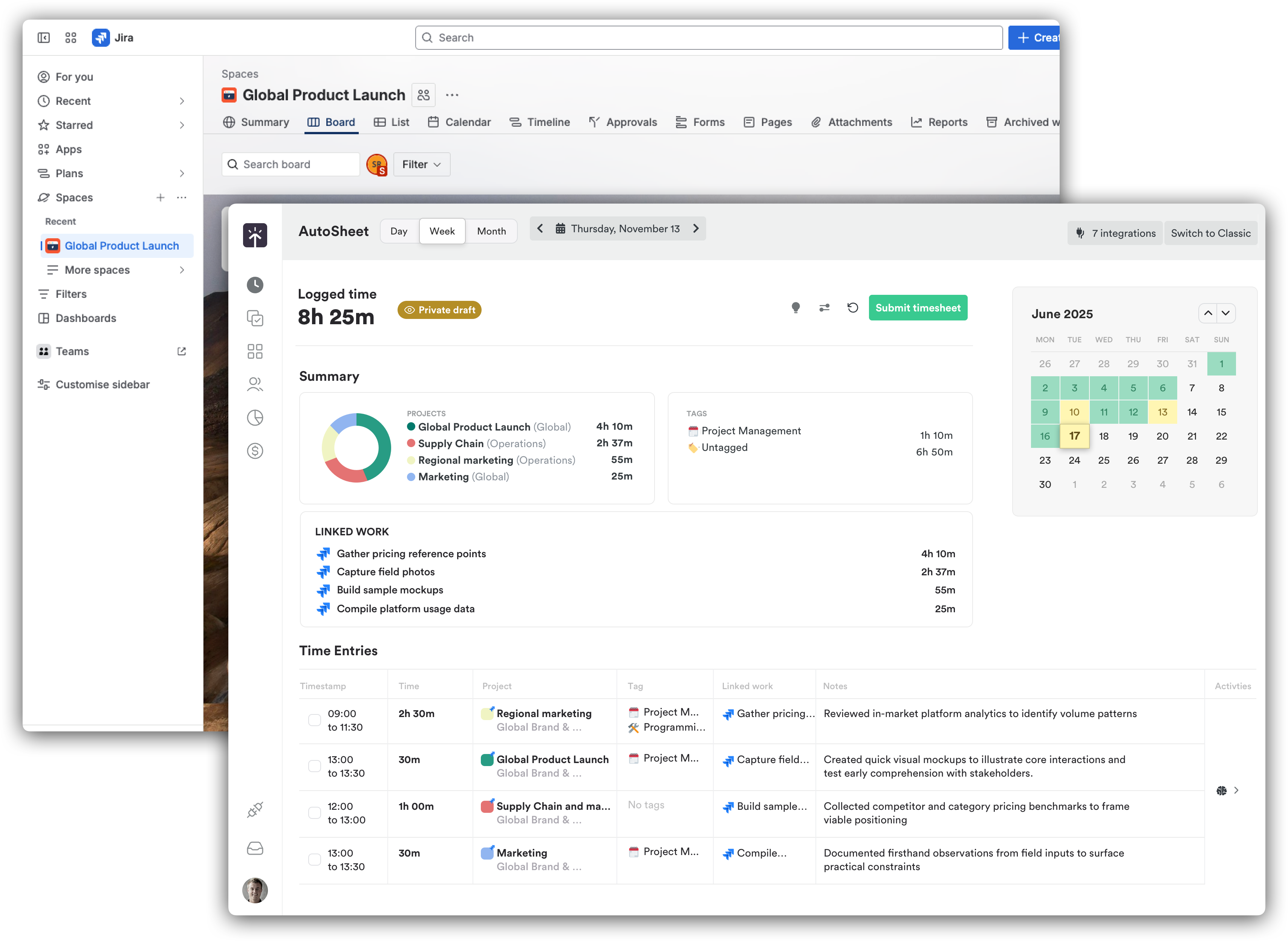
Jira sync integration 🚀
Connect Jira and Timely together for effortless, AI-powered time tracking. Automatically aligns projects, issues, teams, and time entries. Track sprint work effortlessly, compare estimated vs. actual time, generate accurate burndowns, and run better retros with real data. Learn more →
Linear sync integration
The new Linear integration syncs your Linear issues, projects, comments, attachments, cycles, and project updates with Timely, and includes an opt-in "Create Memories" feature that automatically generates activity memories from your Linear work. Learn more →
25 Nov 2025
AutoSheet supercharged with a powerful new Trello integration
6 New
4 Improvements
New Features
Connect with Trello (Beta) 🚀
Custom timeframes for user summaries
Filter your user summary reports by the exact date range you need.
Secure your account with one click
Terminate all other active sessions instantly for enhanced security.
Track your linked work directly in AutoSheet
See all your connected tasks and issues right where you log your time.
Visualize your time at a glance in AutoSheet
Explore your work distribution across projects, tags, and linked items with interactive donut charts and quick-view cards.
Smarter timesheet suggestions
Your linked work now appears in AutoSheet timesheet suggestions when you have active integrations connected.
Improvements
Manage activities more efficiently in AutoSheet
Update multiple activities at once and enjoy smarter splitting and merging.
Richer timesheet emails for AutoSheet
Your timesheet emails now include client names, date ranges, and tags for better context.
Keyboard date navigation in AutoSheet
Move between dates effortlessly using arrow keys (Left/Right for days, Up/Down for weeks), with automatic month transitions.
See AutoSheet time entries on your Timeline
Time entries created in AutoSheet now appear on your main Timeline view.
5 Oct 2025
Your most organized Timely yet...
6 New
3 Improvements
New Features
Simplified tagging
Users on Unlimited and above plans can now keep time entries organized with exactly one tag per entry.
Flexible API filtering
Choose different timeframes when filtering user summaries via API.
Faster task browsing
Find what you need quickly with date range filtering in your task list.
Timestamps in AutoSheet
View timestamps for each entry directly in AutoSheet.
Know your teams at a glance
Hover over team names in the filter dropdown to see helpful tooltips.
Project-level tag control
Set individual projects to allow only one tag per entry.
Improvements
Clearer scheduled reports
Your scheduled report emails now include the report name in the email body.
Fewer interruptions
No more notifications when you simply switch between devices.
Instant calendar setup
Your Office365 calendars are automatically selected when you connect.
Sep 2025
Timely's new AutoSheet leads the way in smarter AI 🚀
6 New
6 Improvements
New Features
AutoSheet phased rollout launch
AutoSheet is Timely's new AI for organizing and logging timesheet data — currently in phased rollout. If you'd like early access, get in touch and we'll enable it for your team.
AutoSheet in your language
Access AutoSheet in additional languages for a more comfortable experience.
Star your important memories
Mark key activities so AI remembers what matters most to you.
Clear AI memory anytime
Fresh start for AI — clear AI's memory anytime from your AI settings.
Better external integrations
Map labels with external systems using the new external_id in our API.
Find projects your way
Filter projects by all, active, or archived status.
Improvements
Clearer project selection
Updated placeholder text makes choosing projects more intuitive.
Granular time tracking
Track time in 5-minute intervals.
Always see your options
All timesheet header buttons now remain visible, with disabled states when not applicable.
Seamless Google Calendar setup
Your calendars are automatically pre-selected when you connect your Google account.
ClickUp sync improvements
Deleted hours are now properly synced with your ClickUp tasks.
Project creation in onboarding
Major update to project setup with better guidance during onboarding.
5 Sep 2025
Updates to the Memory app plus a range of powerful enhancements
3 New
6 Improvements
New Features
Smaller Time Entry Sizes
Enhanced time entry layout with better handling of small heights and dynamic content adjustments, improving visualization for short-duration entries.
Memory Upload Notifications
New email alerts notify you if your Memory app stops uploading data, ensuring you never miss tracking your activities.
Import Manager Enhancements
Added ability to assign default tags and add users to projects during import, making data migration more powerful.
Improvements
New Memory App Version "Aero"
Completely redesigned capture system — faster, more reliable, better handling of time zone changes, improved stability, and enhanced diagnostic tools.
Report Export Options
Made "Logged Hours" optional in export settings.
Teams and Tags Pie Charts
Updated for correct total amounts.
Reduced Batch Size for Reports
Faster load times and fewer timeouts.
monday.com Integration
Sync all projects from a workspace automatically.
Removed "Logged" State
Cleaned up timesheet UI by removing the legacy "Logged" state.
1 May 2025
AI Improvements & Timeline Enhancements
6 New
4 Improvements
New Features
AI-Generated Notes
The AI Timesheet Assistant can now automatically generate descriptive notes for your time entries based on your tracked activities — saving you time and ensuring your entries have meaningful descriptions without manual effort.
List View for Memories
A new structured format for viewing memories — showing app-related memories at the highest level with sub-memories nested beneath. Ideal for users who prefer seeing what happened rather than when it happened.
Summary Lane
Simplifies your memory timeline by showing only the dominant activities in customizable time chunks. Adjust intervals (5, 10, 15, 30 minutes, or 1 hour) to get the right level of detail.
Dynamic Date Range Options for Reports
Added relative date options in Custom Report Templates including "Last 3 months", "Last 6 months", "Last 12 months", "This quarter", "Last quarter", "This year", and "Last year".
Clients and Projects in Data Tables
A comprehensive client & project data view for comparing key metrics across clients (time, revenue, cost, profits) with breakdowns by project, day, week, and month.
Redesigned Report Export Experience
Revamped export modal with scheduled automatic reports, recurring exports, and a more intuitive interface.
Improvements
List/Timeline View Option
Moved the list/timeline switcher to the options dropdown for a cleaner interface.
Memory Timeline Text Overlap
Improved how text displays in the memory timeline to prevent overlapping.
Default Options for Memory Apps
Added intelligent default configurations for popular apps including Google Meet, Zoom, Slack, Microsoft Teams, Outlook, Figma, Linear, and more.
Sub-task Synchronization
Enhanced integration with Asana, ClickUp, and Monday.com to import sub-tasks to Timely.